

Every mobile-detailing invoice needs seven things: your business info, an invoice number and date, itemized services, a travel fee, any deposit already collected, the total, and a payment link. For on-site collection, nothing beats sending a text-to-pay link the moment you finish, since it works with wet hands and gets you paid before you pull out of the driveway. A dedicated platform can build that invoice and send the link without you touching a laptop.
TL;DR:
- Including clear, itemized services and vehicle details prevents disputes and helps customers understand pricing upfront, especially for add-ons and specific vehicle types.
- Travel fees, water-supply charges, and per-mile surcharges should be separate line items to ensure transparency and accurate billing for on-site services.
- Using text-to-pay links immediately after job completion accelerates payment collection and reduces the risk of delayed or lost payments.
- Deposits for large jobs or multiday work should be shown as credits on the final invoice to prevent confusion about what has been paid versus what remains due.
- Utilizing templates for different service scenarios (single job, deposits, recurring plans) speeds up invoicing, minimizes errors, and supports consistent bookkeeping.
Table of Contents
- What a Mobile-Detailing Invoice Must Include
- Ready-to-Use Templates and a Worked Example
- How to Invoice and Collect Payment on the Job
- Payment Methods, Processing Fees, and Tip Handling
- Bookkeeping and Taxes for Mobile Detailers
- How Mobile Detail AI Handles This Workflow
- Why I Treat Invoices as a Sales Tool, Not Paperwork
- Get Paid Faster With Mobile Detail AI
- Sources
- FAQ
What a Mobile-Detailing Invoice Must Include
Most detailers lose money not because their pricing is wrong, but because their invoice is vague. A customer who gets a text that just says "$180, please pay here" has every reason to question it later. A customer who gets an itemized breakdown rarely disputes anything, because the invoice already answered the question before they asked it.
Start with the basics that any service invoice needs, then layer on the fields that only matter because you work out of a van instead of a shop.
Core business and job identification. Every invoice needs your business name, phone number, email, and whatever remittance details apply if you accept ACH or check. Pair that with a unique invoice number and both the issue date and due date, even if "due date" just means "due on completion." Numbering matters more than detailers think. When a customer calls back in three weeks asking about "that invoice from last month," you want to pull it up in five seconds, not scroll through a text thread.
Customer and vehicle details. List the customer's name and the on-site service address, not just their billing address. Detailers who work multiple properties in a day (an office fleet in the morning, a homeowner's driveway in the afternoon) need that address on record for their own scheduling history as much as for the invoice. Add vehicle make, model, year, and color. If you're applying a ceramic coating or paint protection film, include the VIN. Coating warranties are tied to a specific vehicle, and a VIN on the invoice protects you if a customer tries to transfer a warranty to a car you never touched.
Itemized services with clear pricing logic. Break out each service as its own line rather than bundling everything into one number. If you price by vehicle size (sedan, SUV, truck, three-row), say so on the invoice, not just verbally at booking. If a service is hourly versus flat rate, note which one applies. Add-ons requested on-site (pet hair removal, engine bay cleaning, headlight restoration) get their own lines too. A worked invoice template built around vehicle identification and line-by-line services makes this easier to standardize than reinventing the format every job.
Mobile-specific fees. This is where generic invoice templates fall apart, because they're built for businesses that don't drive to the customer. You need a travel or call-out fee, and if you serve a wide radius, a per-mile surcharge for anything past your base zone. If the customer's property lacks an outdoor spigot and you're hauling your own water tank, that's a water-supply fee, and it belongs on its own line so the customer understands why the price is higher than your advertised rate. Typical travel fees run in the $15 to $50 range depending on distance, according to detailing invoice template guidance, though your own zone pricing should reflect your actual drive time and fuel costs.
Deposits and credits. If you collected a deposit at booking, show it as a line item credit against the total, not as a separate transaction the customer has to mentally track. This matters most on higher-ticket jobs like coatings, where deposits are common and the gap between booking and final payment can be weeks.
Tip line placement. If you accept tips, put the tip line after the subtotal and before the grand total, clearly labeled as optional. Some detailers route tips straight to the technician who did the work rather than the business account, which needs to be reflected in how you record it internally, even if the customer never sees that distinction.
Here's the quick-reference version:
- Business name, contact info, invoice number, issue/due date
- Customer name and on-site service address
- Vehicle make, model, year, color (VIN for coatings or PPF)
- Itemized services with pricing basis (flat, hourly, size tier)
- Travel/call-out fee, per-mile surcharge, water-supply fee if applicable
- Deposit shown as a credit, not a separate charge
- Optional tip line, clearly labeled
- Total due and payment link or instructions
Ready-to-Use Templates and a Worked Example
You don't need custom invoicing software to get this right. Three template patterns cover almost every job a mobile detailer runs, and you can build all three in a free tool or a basic invoicing app in under twenty minutes.
-
Template A: Single-job invoice, paid on completion. This is your default for one-time interior/exterior details. Fields: business header, invoice number/date, customer name and address, vehicle details, itemized services (exterior wash, interior vacuum, tire shine), travel fee, subtotal, tax if applicable, total due, payment link. No deposit line needed since payment happens on-site.
-
Template B: Deposit plus balance, for coatings or multi-day jobs. Use this whenever you collect money up front, which is standard for ceramic coating and paint correction work that spans a full day or more. The final invoice shows the full job cost, then a line reading "Deposit paid on [date]: minus EX," followed by the remaining balance due. Showing the deposit as a credit rather than omitting it avoids the confusion that comes from a customer forgetting how much they already paid, an issue that comes up often enough on high-value detailing jobs that it's worth building into the template permanently rather than handling case by case.
-
Template C: Recurring membership invoice. For customers on a monthly or quarterly maintenance plan, name the plan clearly ("Monthly Maintenance Wash," "Quarterly Interior Refresh") and set a fixed billing cadence, either auto-billed on the same date each cycle or sent manually after each visit. Keep the line items consistent across cycles so the customer can compare invoices at a glance and see they're getting the same service for the same price.
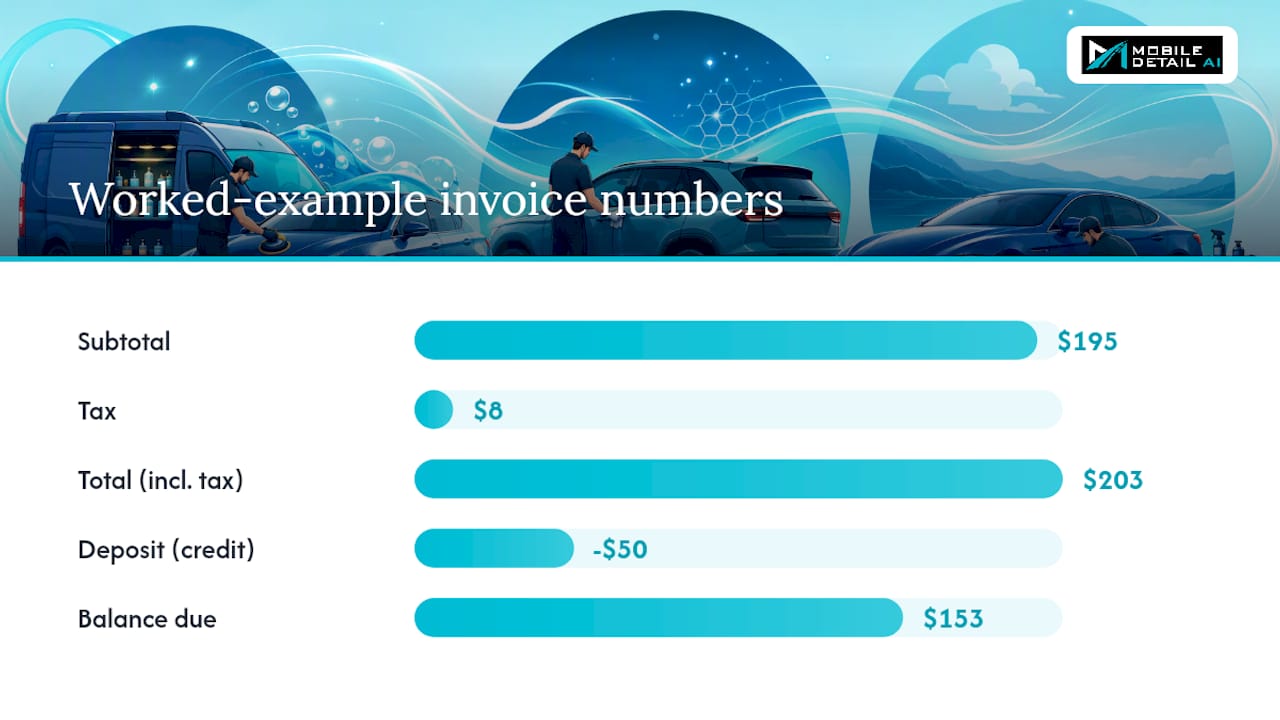
Worked example. Say you detail a mid-size SUV with a $150 base package, add engine bay cleaning for $25, and charge a $20 travel fee for a customer 18 miles outside your base zone. That's a $195 subtotal. The customer already paid a $50 deposit at booking. Local sales tax on the taxable service portion varies by state; check your state's rules since not every state taxes detailing services the same way. Your invoice shows: subtotal $195, tax $8, total $203, deposit credit minus $50, balance due $153. That balance due figure, not the $203, is what goes into your payment link. Detailers who send the full total instead of the adjusted balance are the number one cause of "wait, I already paid you" phone calls.
Once you've built these three templates, save them directly in whatever tool you use to invoice, whether that's a phone-based app, a PDF you duplicate and edit, or a platform with saved presets. The goal is that you never build a line item from scratch on a driveway. You pull a template, adjust vehicle details and any on-site add-ons, and send it in under two minutes.
How to Invoice and Collect Payment on the Job
The gap between finishing a job and getting paid is where most mobile detailers lose time and, occasionally, lose the payment entirely. A tight, repeatable workflow closes that gap to a few minutes.
-
Set up before you arrive. Confirm the booking, apply any deposit rules (coatings and multi-hour jobs typically need one), and have your service menu with pricing tiers already loaded, whether in a scheduling app or a laminated card in your van. Pricing decided in advance means you're not negotiating on the customer's driveway.
-
Build the invoice from presets as you finish. Pull your preset line items for the base service, then add whatever the customer requested on-site: pet hair removal, an extra coat of wax, headlight restoration. Confirm the total with the customer face-to-face before sending anything. This step alone prevents most billing disputes, because the customer agrees to the number while the finished car is still in front of them.
-
Choose your collection method, fastest first. A text-to-pay link is the quickest and cleanest option for driveway work, since it doesn't require touching a card reader with detailing chemicals still on your hands. Tap-to-pay through a phone-based reader is a close second. A physical card reader works fine but adds a step. Manual collection, meaning checks or cash, should be your last resort since it creates a bookkeeping gap between the job and the deposit hitting your account.
-
Send the receipt immediately after payment clears. Attach any before/after photos you took and a short job note (unusual pet hair, existing paint damage, anything relevant to a future visit) to the customer's record. This builds a service history that pays off the next time that customer books, especially if a dispute ever comes up about prior work.
-
Update the customer's file. Whether you're tracking this in a spreadsheet or a CRM, log the vehicle, the services performed, the price paid, and the date. Six months from now, when that customer calls to rebook, you'll want to quote the same price and remember the same add-ons without asking twice.
A short script helps here too. Something as simple as "I've sent the invoice to your phone, it's a secure link, you can pay by card right there" removes any hesitation about clicking a text link from an unfamiliar number. After payment: "Got it, thank you. I'll text you the before and after photos in a minute." That second message does double duty, since it confirms payment went through and gives the customer content worth sharing.
Pro Tip: Keep your service menu and pricing tiers saved as a template you can duplicate for every new job. Detailers who build each invoice from scratch spend an extra three to five minutes per job doing math they've already done a hundred times before.
Occupational data on cleaning and grounds work points to the kind of scheduling pressure detailers already know firsthand: jobs often run back-to-back with tight windows between them, according to the Bureau of Labor Statistics. A workflow that collects payment in under two minutes isn't a nice-to-have when you've got three more jobs booked that afternoon.
Payment Methods, Processing Fees, and Tip Handling
You've got four realistic ways to collect payment on a driveway, and they're not equally good for mobile work.
- Physical card readers and mobile terminals work reliably but require you to hand the customer a device or ask them to tap their card against yours, which is awkward when you've got detailing product on your hands.
- Text-to-pay secure links let the customer pay from their own phone, on their own time, without any physical handoff. This matters more than it sounds, since it's the difference between finishing a job clean and finishing a job, then wiping your hands, then fumbling with a reader.
- ACH or bank transfer makes sense for large deposits on coating jobs or for fleet accounts paying net terms, where card processing fees on a $2,000 invoice would eat a meaningful chunk of your margin.
- Cash or check still comes up, particularly with older or repeat customers, but it's the slowest to reconcile and easiest to lose track of.
Text-to-pay solves a problem specific to this trade: wet or product-covered hands and a customer who's standing there admiring a freshly cleaned car and feeling good about tipping or upgrading. A payment link workflow that lets the customer pay from their own device, right at that moment, tends to convert more of that goodwill into an actual tip or an add-on sale than making them wait for an emailed invoice later that night, when the impulse has faded.
Some detailers build the fee into their base pricing and absorb it quietly. Others pass it through as a separate line, which is legal in most states but requires disclosure. If you choose to pass the fee along, say so clearly on the invoice rather than burying it in the total. Transparency here isn't just good practice, it heads off the exact kind of dispute an itemized invoice is supposed to prevent in the first place.
For tips, place the line clearly after the subtotal, label it optional, and decide up front whether tips go into the business account or straight to the technician who worked the job. If you run a multi-van operation, this decision needs to be consistent across every crew, or you'll end up fielding complaints from techs comparing notes.
Bookkeeping and Taxes for Mobile Detailers
Bookkeeping doesn't need to be complicated to be effective. It needs to be consistent.
For every job, keep four things: the invoice itself, any job photos you took, the vehicle details, and a record of the deposit if one was collected. That's the minimum file a detailer needs to answer almost any customer question or tax question that comes up later.
- Invoice with itemized services and total paid
- Before/after job photos, especially for coating and correction work
- Vehicle details (make, model, VIN if applicable)
- Deposit record showing date and amount, tied to the final invoice
Track your business mileage every time you drive to a job, not just at tax time when you're trying to reconstruct months of driving from memory. A simple trip log (date, starting point, destination, miles) takes fifteen seconds per trip and saves hours of guesswork later. It also gives you real numbers to base your travel fee on instead of guessing.
Reconcile your books on a regular cadence, ideally weekly if daily isn't realistic. Check payments received against invoices sent, flag anything still outstanding, and watch for chargebacks before they pile up. The SBA's guidance on managing small-business finances recommends exactly this kind of routine reconciliation as one of the simplest ways to catch problems before they become expensive ones.
Fleet and PO-based customers need a slightly different invoice structure. Batch multiple vehicles into a single invoice when a fleet account books several cars in one visit, include the purchase order number if the client requires one, and set clear payment terms, typically Net 7 to Net 30 depending on the account size and your comfort level extending credit. A fleet management resource is worth a look if you're taking on your first recurring fleet client, since fleet billing habits differ enough from residential work that it's worth adjusting your process before problems show up.
Keep digital copies of every invoice for at least a few years, backed up somewhere other than just your phone. A cloud storage folder or a basic accounting app both work, as long as you're not relying on a single device that could break, get lost, or get stolen.
How Mobile Detail AI Handles This Workflow
Everything described above, the itemized fields, the travel fees, the text-to-pay collection, the customer history, can be built manually with a spreadsheet and a payment app. It can also be handled inside a single platform built specifically for this trade.
Some platforms tie invoicing directly to the rest of the job, rather than treating billing as a separate task bolted on at the end. Such platforms can include features like a mobile invoice builder with preset service menus, payment links sent directly to customers, client and vehicle history logs, visual scheduling and route optimization to reduce windshield time, and integrated payment processing that connects invoicing and collection seamlessly.
In practice, the flow can look like this: a customer books through a marketplace, the job gets scheduled with route optimization factored in, the detail is completed, and the invoice generated from saved presets on-site; the customer receives a text-to-pay link, and the payment, receipt, and updated vehicle history all log automatically once the customer pays.
Why I Treat Invoices as a Sales Tool, Not Paperwork
Most detailers think of the invoice as the last, boring step of a job. That's backwards. An invoice that's clear and itemized is doing sales work, not just billing work. Customers who see exactly what they paid for are far more likely to say yes to the next upsell, because they trust that the pricing has been straight with them all along. A vague total invites a vague relationship.
Speed matters just as much as clarity. A payment collected on-site, in the two or three minutes after you finish, is money that never needs chasing. A payment left for "I'll invoice you later" turns into a follow-up text, then a follow-up call, then a write-off you didn't plan for. Cash flow problems in this trade rarely come from underpricing. They come from underinvoicing.
The templates you use on day one won't be the same ones you use once you're running three vans instead of one. That's fine. What matters is building the habit early: itemize everything, show deposits as credits, and never leave a driveway without a payment link already sent.
— Mobile
Get Paid Faster With Mobile Detail AI
Some platforms are built around workflows involving preset service menus, on-site invoice generation, and text-to-pay collection, all tied to a customer's vehicle history instead of scattered across separate apps.

If you're running invoices manually right now, the shift isn't complicated. The provider subscription plans start at $1 per month for the CRM-only tier, scale to $59 per month for full marketplace access, and top out at $139 per month for the Preferred tier with the complete feature set. Solo detailers who just want scheduling and invoicing without marketplace exposure can start light; multi-van operations that want new customer bookings alongside the CRM tools have room to grow into the higher tiers. Browse how services get listed on the provider discover page to see how packages, coatings, and add-ons appear to customers booking through the marketplace. If you're ready to stop rebuilding invoices from scratch on every driveway, visit the provider subscription page and pick the plan that matches how many vans you're running today.
Sources
- Bureau of Labor Statistics — Building and Grounds Cleaning Workers
- U.S. Small Business Administration — Manage your finances
- Houseler — Auto Detailing Invoice Template (Free 2026)
- Aviy — Car detailing invoice template: guide and examples
FAQ
How Do I Charge for Mobile Detailing?
Price by vehicle size tier (sedan, SUV, truck) or by package (interior only, full detail, coating), then add a travel or call-out fee on top for driving to the customer. Itemize each of these separately on the invoice rather than folding them into one flat number, so the customer sees exactly what they're paying for.
How Profitable Is Mobile Car Detailing?
Profitability depends heavily on how efficiently you schedule jobs and how fast you collect payment, since chasing invoices eats into time you could spend detailing. Detailers who use route optimization and same-day text-to-pay collection typically keep more billable hours in a day than those juggling separate scheduling and invoicing tools.
How Much Does Mobile Detailing Cost Per Hour?
Mobile detailing pricing usually isn't quoted as a flat hourly rate. It's built from a base package price plus a travel fee, with hourly billing reserved for add-on work like paint correction that takes longer than a standard package. Building your invoice around itemized services rather than an hourly number also makes pricing easier for customers to understand upfront.
How Much Should I Tip for a $200 Car Detail?
If you accept tips as a detailer, place that line clearly on the invoice, labeled optional, right after the subtotal.
What Does Mobile Detail AI Cost for Providers?
Mobile Detail AI offers three provider tiers: CRM-Only at $1 per month, Marketplace at $59 per month, and Preferred at $139 per month, all listed on the provider subscription page. Solo detailers can start with the CRM tools and move up as they add marketplace bookings.