
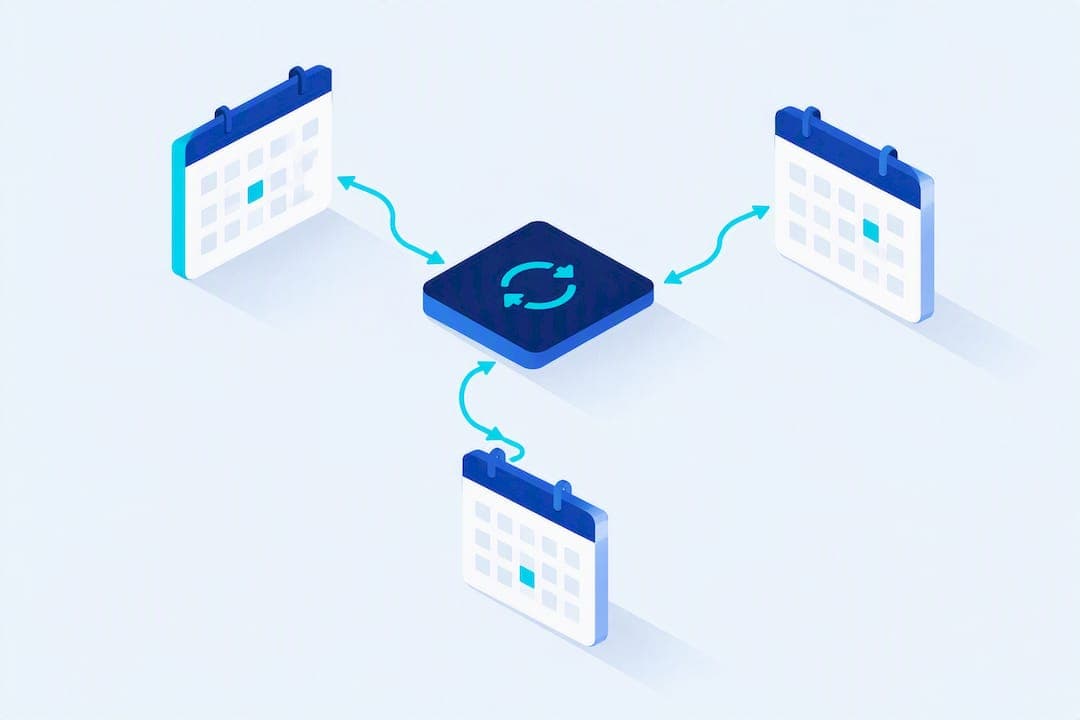
Use a resource-aware scheduling layer or a vertical detailing CRM with two-way calendar sync to prevent double bookings and cut no-shows. When you integrate calendar tools with your service catalog, staff assignments, and bay availability, you get fewer scheduling conflicts, more accurate capacity planning, and a measurable drop in missed appointments, as seen in the way Alternative Car Care connects detailing calendars with customer records and booking workflows. Some platforms are built specifically for this job.
TL;DR:
- Integrating resource-aware scheduling with service-specific durations and buffers reduces double bookings and improves capacity planning for detailing shops.
- Using unified calendar APIs like Nylas or programmable sync tools like CalendarPipe minimizes maintenance issues and ensures reliable cross-provider synchronization.
- Testing sync accuracy involves confirming correct timezone handling, conflict rules, and private event privacy, to prevent silent scheduling errors.
- Effective appointment management requires staffing based on skills, bay availability, and capacity limits, with visual calendar views to easily identify conflicts.
- Implementing a multi-touch reminder and deposit policy significantly decreases no-shows, especially for high-value services like ceramic coatings.
Table of Contents
- Setting Up a Service Calendar for Detailing Appointments
- How Do You Integrate Calendars With Other Providers?
- What Should You Test Before Trusting the Sync?
- Matching Appointments to Staff, Bays, and Skills
- Cutting No-Shows With a Reminder Sequence
- Your Step-by-Step Calendar Integration Checklist
- A Practitioner's Take on Where Calendars Go Wrong
- A Turnkey Option for Shops That Don't Want to Build This Themselves
- Sources
- FAQ
Setting Up a Service Calendar for Detailing Appointments
Before you sync anything, your calendar needs a real service catalog behind it. A calendar full of generic 60-minute blocks tells you nothing about what actually happened in that hour, and it makes staffing decisions a guessing game.
Start by breaking your offerings into distinct services with accurate durations. A full interior detail on a three-row SUV takes longer than the same service on a sedan, so build that difference into your catalog rather than rounding everything to a flat hour. Add-ons like pet hair removal or engine bay cleaning should stack onto the base time automatically instead of getting absorbed into a padded estimate.
From there, lock in the operational rules that keep your day from falling apart:
- Buffer time between appointments (15 to 30 minutes for mobile techs driving between jobs)
- Minimum advance notice required for booking (24 to 48 hours is common)
- Cancellation windows and deposit requirements tied to service value
- Recurring weekly availability by location, plus blackout dates for holidays or fleet contracts
- Automated booking confirmations and a reminder sequence triggered the moment a slot is reserved
Get this foundation right and every integration you build on top of it actually reflects your real capacity.
How Do You Integrate Calendars With Other Providers?
Three practical routes exist for connecting your booking system to Google, Outlook, and Apple calendars, and each fits a different stage of business.
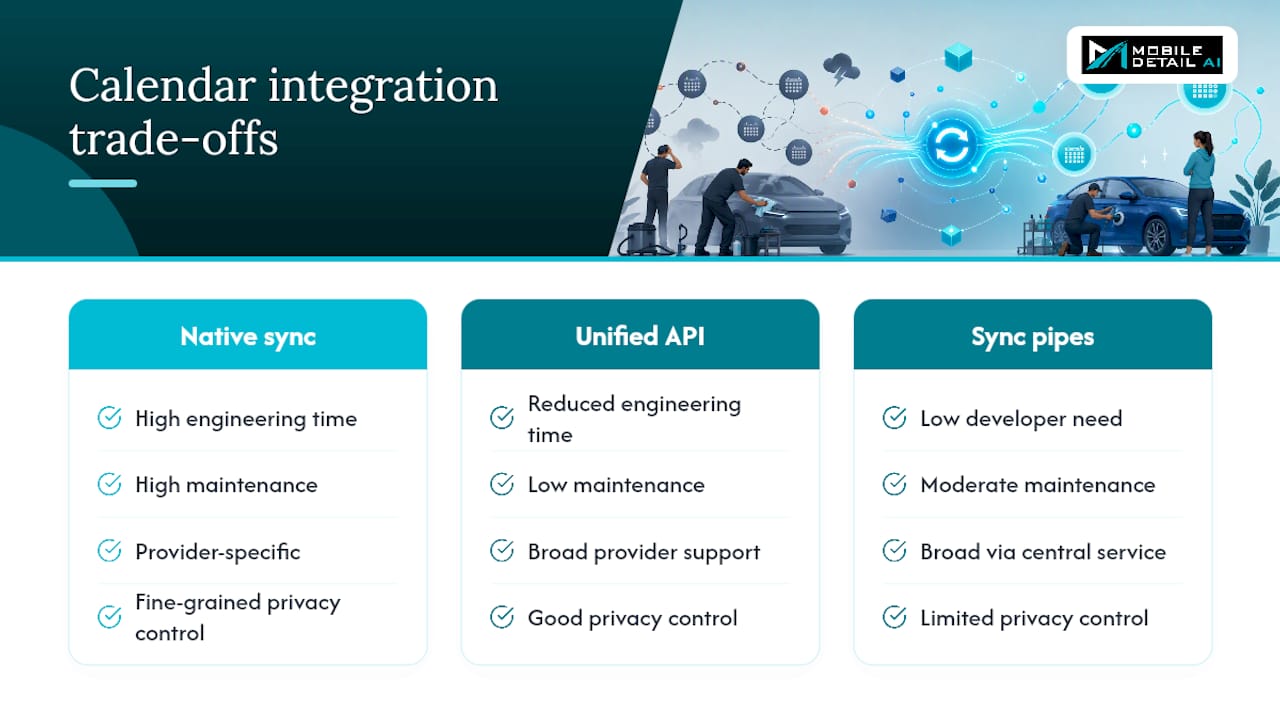
Native two-way sync uses OAuth to link directly with a provider's calendar. It's the smoothest experience when it works, but you're at the mercy of each provider's API quirks and rate limits, and you'll need engineering time to maintain it as Google or Microsoft changes their endpoints.
Unified calendar APIs solve that maintenance headache by normalizing the differences between providers behind one interface. The Nylas Calendar API supports event creation, free/busy queries, recurring event structures, and webhook notifications across Google, Outlook, Exchange, and iCloud, so your team writes integration logic once instead of three times.
Programmable sync pipes are the pragmatic middle ground for shops without a developer on staff. CalendarPipe connects Google, Outlook, and Apple calendars and can deliver events as standard email invitations, which means recipients don't need to grant OAuth access at all. OneCal takes a similar approach, centralizing multiple calendars while letting you control exactly how much event detail gets copied between them.
The trade-off comes down to engineering time versus cost versus how much privacy control you need over what staff and customers see.
What Should You Test Before Trusting the Sync?
Connecting calendars is the easy part. Trusting them is where shops get burned, usually a few weeks in when a customer shows up for an appointment that got silently dropped.
- Pick one source of truth. Decide whether your booking platform or a staff member's personal calendar wins in a conflict, and enforce that rule everywhere.
- Test invitation-based delivery if OAuth access isn't practical for a provider, since an ICS invite still lands reliably in nearly any calendar app.
- Run full create, update, and cancel cycles on a test booking and confirm reminders fire correctly at each stage.
- Check timezone handling for mobile detailers crossing time zones, and watch how recurring appointments behave when one instance gets rescheduled.
- Verify private-event details display the way you expect. Some sync tools show attendee names and service notes; others show only "Busy," which matters for staff calendars that customers might glimpse.
Skipping these checks is how a shop ends up double-booked on a Saturday morning, which is exactly when you can least afford it.
Matching Appointments to Staff, Bays, and Skills
A calendar that only tracks time slots misses half the problem. Detailing shops run on limited physical space and uneven skill levels, and your scheduling system needs to know both.
- Tag services requiring a senior tech (paint correction, ceramic coating) and route them only to staff with that skill
- Lock a bay for the full duration of a multi-hour job so it can't get double-booked against a 30-minute wash
- Configure concurrent-capacity rules so your system knows exactly how many vehicles can be worked on at once
- Build in travel-time buffers and territory-based availability for mobile units so a tech isn't scheduled across town with no drive time
- Use per-bay, per-tech, and route-aware calendar views so managers can spot conflicts visually instead of digging through a list
Scheduling tools built for detailing shops increasingly bake in bay allocation and skill-based dispatch for exactly this reason.
Pro Tip: Give every bay its own calendar color and every tech their own filter view. It takes an afternoon to set up and saves you from squinting at a wall calendar every morning trying to figure out who's free.
Cutting No-Shows With a Reminder Sequence
A single reminder text is not a strategy. Scheduling platforms that track this consistently point to a multi-touch reminder sequence as the difference between a booking that sticks and one that quietly evaporates.
The cadence that works best combines timing and channel:
- Instant confirmation the moment the booking is made (email or SMS)
- A reminder 48 to 72 hours out, giving customers time to reschedule instead of no-showing
- A day-of reminder sent by SMS, since text messages get opened faster than email
- A reschedule or cancel link embedded directly in the message, plus a one-line prep instruction ("please clear personal items from the back seat")
For high-value services like ceramic coating or paint protection film, require a deposit or card-on-file before confirming the slot. It filters out casual bookings that were never serious.
Statistic Callout: Track your no-show rate before and after adjusting reminder timing, and test different send windows to see which combination of channel and timing actually moves the number for your customer base.
Your Step-by-Step Calendar Integration Checklist
- Audit every calendar currently in use across your team and pick one as the official source of truth.
- Build your full service catalog, mapping each service to the staff skills and bays it requires.
- Choose your integration approach, whether native OAuth sync, a unified API layer, or a programmable pipe, and configure the connection or invite flow.
- Run test bookings that create, update, and cancel an appointment, then confirm reminders and payment flows fire correctly at every step.
- Train your staff on the new system before flipping the switch on live bookings.
- Schedule follow-up audits at 30 and 90 days to catch drift, missed sync events, or reminder failures before they cost you a customer.
This sequence isn't glamorous, but skipping steps is exactly how shops end up right back where they started, just with a fancier calendar app doing the same manual work.
A Practitioner's Take on Where Calendars Go Wrong
Most shops treat the calendar as an afterthought bolted onto whatever booking form they found first. That's backwards. The calendar is your operations backbone, and the mistakes I see repeat are boring: mismatched service durations, missing buffers between mobile jobs, and cancellation paths nobody tested until a customer hit one live.
— Mobile
A Turnkey Option for Shops That Don't Want to Build This Themselves
If everything above sounds like a lot of configuration work for a business that's supposed to be detailing cars, not managing API integrations, that's the gap Mobile Detail AI was built to close. Instead of stitching together a booking form, a separate calendar tool, and a payment processor, you get intelligent scheduling, route optimization, and secure payment processing in one system built specifically for detailing operations.

Solo detailers get a CRM that handles the same buffer, deposit, and reminder logic described above without custom development. Multi-van operations and franchises get bay and route-aware scheduling that keeps techs from double-booking themselves across a spread-out territory. The CRM-Only plan runs $1 per month for shops that just want the scheduling backbone, while the Marketplace plan at $59 per month adds customer-facing booking and discovery. Shops that want both the marketplace exposure and priority placement can step up to the Preferred plan at $139 per month.
Browse how service categories appear to customers on the discover page, or check out a live provider profile like Phenomenal Auto Care to see how scheduling and service listings work together in practice.
Sources
FAQ
What Is the Best Way to Integrate Calendars for a Detailing Shop?
The most reliable approach is a resource-aware scheduling system with two-way sync to Google, Outlook, and Apple calendars, layered on top of a defined service catalog. Platforms like Mobile Detail AI build this directly into the CRM so you don't need a separate sync tool.
Do I Need a Developer to Sync Multiple Calendar Providers?
Not necessarily. Programmable sync services like CalendarPipe and OneCal handle cross-provider syncing without custom code, while a unified API like Nylas is the better fit if you have engineering resources and want deeper control.
How Do I Reduce No-Shows Once My Calendar Is Integrated?
Send a confirmation at booking, a reminder 48 to 72 hours out, and a day-of SMS reminder, following the multi-touch cadence that scheduling platforms consistently recommend. Requiring a deposit on high-value services adds another layer of commitment.
Can Mobile Calendars Account for Travel Time Between Jobs?
Yes. Mobile detailers should build travel-time buffers and territory-based availability rules directly into their calendar so techs aren't scheduled back-to-back across long distances, a common source of late arrivals in mobile operations.