
Fleet detailing management is the software layer that lets detailing providers schedule jobs, sequence routes, invoice customers, and track each vehicle's service history in one system. Done right, it cuts no-shows, tightens drive time between stops, gets invoices paid same-day, and turns one-time ceramic coating or paint protection film jobs into recurring maintenance revenue. The rest of this guide breaks down the features that matter, how to test them before you buy, and how to roll the software out without stalling your crews.
TL;DR:
- Routing and scheduling features that optimize route order and ETA updates are crucial for maximizing daily job capacity and reducing drive time.
- A vehicle-level CRM with detailed service history, VIN, and photo archives significantly improves maintenance tracking for customers with multiple vehicles.
- Mobile-first workflows for photo capture, invoicing, deposits, and signatures are essential for technician adoption and operational efficiency.
- Running a real pilot with actual customer data and route days, involving technicians, provides a more accurate assessment of software fit than demos alone.
- Recurring maintenance programs and automated reminders help stabilize revenue streams and improve customer retention over time.
Table of Contents
- What Does Fleet Detailing Management Software Actually Do?
- Which Features Actually Move the Needle?
- How Do You Evaluate and Choose the Right Platform?
- How Do You Roll Out Detailing Software Without Disrupting Operations?
- How Do Recurring Programs Scale Fleet Detailing Operations?
- Why a Detailing-Focused CRM Often Beats a Generic Field-Service App
- Try Mobile Detail AI Against Your Own Workflow
- Sources
- FAQ
What Does Fleet Detailing Management Software Actually Do?
Strip away the marketing language and fleet detailing management software runs five connected workflows every detailing business already performs by hand, phone, or spreadsheet. The difference is whether those workflows talk to each other.
It starts at booking. A customer calls or books online, and the system should capture more than a name and phone number. It needs the vehicle: make, model, year, VIN, existing coatings, and whatever service history already exists, because a detailer with three vehicles on file needs three separate maintenance clocks running, not one blended customer record.
From there, scheduling has to account for reality. A ceramic coating job takes hours; a wash-and-vacuum takes twenty minutes. Software that treats every slot as identical either overbooks your day or wastes half of it.
For mobile operators, route sequencing is where the real money sits. The system should order stops by geography, not by the order customers called in, and push ETA updates so nobody's staring at their phone wondering when the van shows up.
On-site, the job needs:
- Before and after photos attached directly to that vehicle's record, not a camera roll
- A signature capture for sign-off
- A deposit or full payment taken on the spot
- An invoice generated before the technician pulls out of the driveway
Afterward, the system should fire off maintenance reminders tied to the actual coating or install date, offer a membership renewal, and request a review while the finish is still shining. Miss that follow-up window and you're back to cold outreach instead of automated repeat business.
Which Features Actually Move the Needle?
Not every feature on a vendor's checklist earns space in your budget. Here's the order that actually affects revenue and daily operations, ranked by impact:
- Routing and scheduling. Geo-sequenced stops, variable-duration slots, and traffic-aware ETAs recover capacity you're currently losing to bad drive order. Field-service roundups point to route sequencing as one of the primary levers for squeezing an extra job into a mobile operator's day.
- Mobile-first workflow. Photo capture inside the job record, on-site invoicing, deposits, and signatures decide whether your techs actually use the tool, since most of the work happens away from a front desk.
- Recurring plans and automated reminders tied to coating or install dates, so a one-time PPF job becomes a standing six-month checkup.
- Scaling features: multi-location support, user roles, reporting, and accounting integrations.
- Support and trial quality: real onboarding help and a pilot option that lets you test with actual jobs, not a canned demo.
Pro Tip: Ask any vendor if you can import three real customer records and run a live route day before you sign anything. If they hedge, that's your answer.
How Do You Evaluate and Choose the Right Platform?
Start by writing down your "must pass" scenarios before a single demo call. What happens when a customer reschedules mid-route? Can a tech add a coating record from the driveway? If the vendor can't show you that exact flow, the rest of the demo is theater.
Then test with real work. A buyer's guide on shop management software recommends entering actual customers and running actual route days rather than trusting a polished sales walkthrough, because demos are built to hide friction, not expose it. Enter three real customers, run two route days, and invoice at least one job live from a phone.
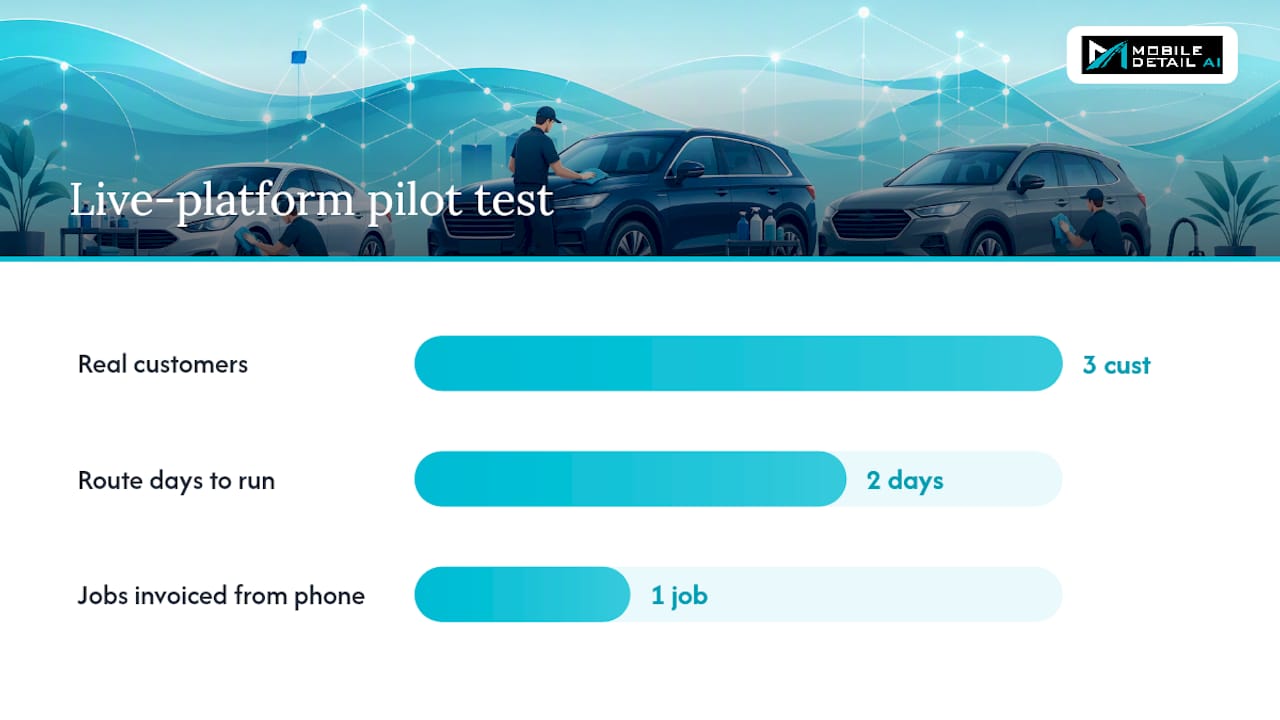
Bring a technician into that pilot, not just the office staff. They're the ones who'll fight with the photo upload and the signature pad every single day.
Use this quick checklist during evaluation:
- Does pricing show clearly on the vendor's site, or do you have to book a call to find out?
- Can you export your customer and vehicle data if you leave?
- Does it integrate with your accounting software and existing tools?
- Is vehicle history a first-class field, or bolted onto a generic contact record?
| Signal | What it means |
|---|---|
| No mobile app, or a clunky one | Techs will avoid it within a week |
| Vehicle fields limited to "notes" | You'll lose coating and VIN history over time |
| No route sequencing, just a calendar | You're still doing dispatch manually |
| Data locked to the platform, no export | You're stuck if the vendor raises prices or shuts down |
How Do You Roll Out Detailing Software Without Disrupting Operations?
A messy launch costs you more than a slow evaluation ever will. Run it in stages.
- Prep first. Standardize your service packages, clean up existing customer and vehicle records, and set real maintenance intervals for each coating or protection product you sell.
- Run a short pilot. Give it 7 to 14 days with defined acceptance criteria. The three metrics that actually predict success are technician adoption rate, the percentage of jobs with required photo documentation, and average invoice time-to-capture.
- Launch fully. Train the whole team on a set schedule, turn on automated reminders and membership billing, and give every tech a day-one checklist so nobody's guessing.
- Review monthly. Track adoption and invoicing speed, export data backups regularly, and keep a feedback loop open with the crew actually using it.
Pro Tip: Set your pilot acceptance number before day one, not after. "We'll know it when we see it" is how pilots quietly become permanent half-adoptions.
How Do Recurring Programs Scale Fleet Detailing Operations?
Membership plans smooth out the seasonal swings that hit most detailing businesses. Instead of chasing one-time bookings every spring, a coating or PPF membership locks in a maintenance cadence that fills slower months automatically, and recurring maintenance plans are consistently cited as a major lever for lifting customer lifetime value.
As you add vans or locations, dispatch discipline matters more, not less, and partner resources on workflow automation practices for mobile fleets provide a useful model for assignment logic and dispatch.] Depot-based routing, where jobs get assigned by proximity to each van's starting point rather than first-come scheduling, keeps drive time down even as your fleet grows. Partner resources on fleet operations point to structured scorecard tracking as a useful model for keeping multi-van days accountable, and the same logic on assignment and workflow automation shows up in recruiter and dispatch workflow practices built for larger fleets.
Watch these numbers monthly:
- Utilization: hours booked versus hours available per van
- Average ticket: revenue per job, tracked by service type
- Repeat rate: percentage of customers on a recurring plan
- Invoice close time: how long between job completion and payment received
If you're adding staff or bringing on franchise partners, settle data ownership and access roles early. Someone leaving the business shouldn't mean losing years of vehicle history.
Why a Detailing-Focused CRM Often Beats a Generic Field-Service App
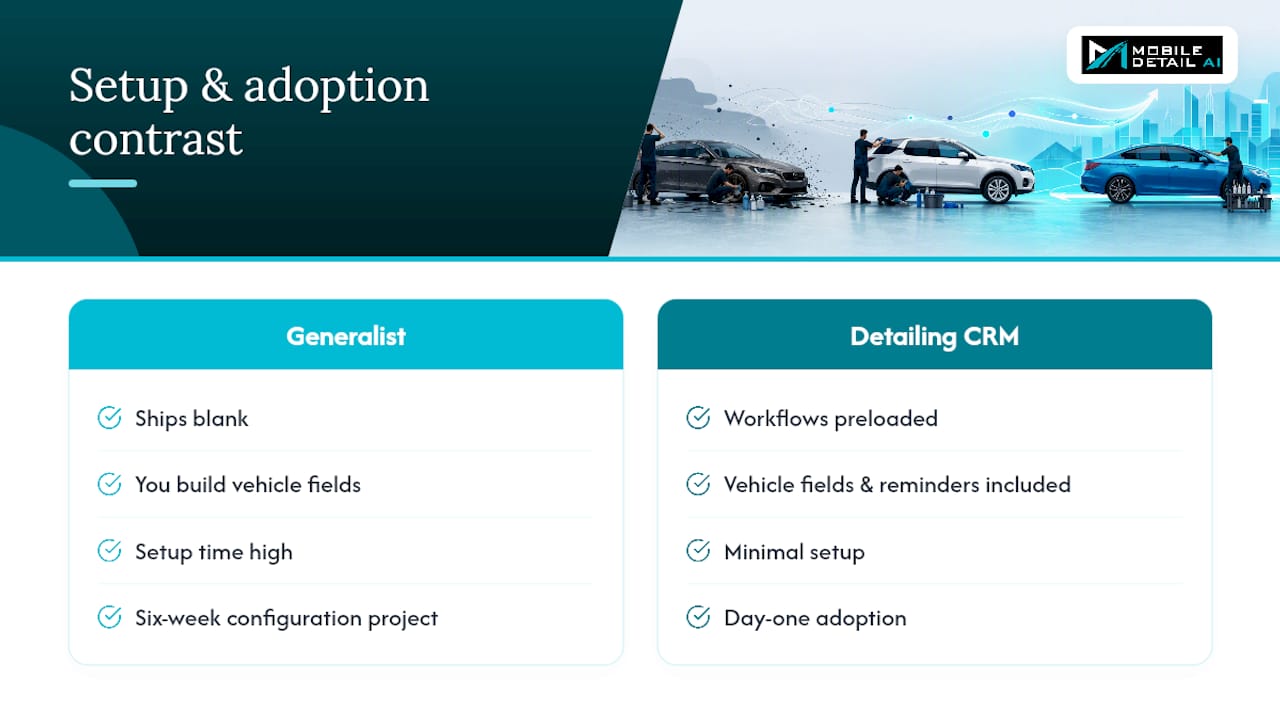
Generalist field-service software can look attractive on price, but it ships blank. You're the one building vehicle fields, coating reminders, and photo workflows from scratch, and that setup time is where a lot of small operators lose momentum before they ever get value out of the tool.
A platform built specifically for detailing, like Mobile Detail AI, ships with those vehicle workflows already in place. That's not a small convenience. It's the difference between day-one adoption and a six-week configuration project that your techs quietly route around by texting each other instead.
— Mobile
Try Mobile Detail AI Against Your Own Workflow
Mobile Detail AI was built around the exact gaps this guide covers: vehicle-specific records with coating and service history, mobile-first photo capture and invoicing, route-aware scheduling, and secure in-field payments, all inside one CRM instead of five disconnected apps.

If you've read this far, you already know the smartest move isn't trusting a demo. Run the same pilot checklist from the rollout section above against Mobile Detail AI directly: load three real customer and vehicle records, run a route day, and invoice a job from your phone before committing. The CRM-Only, Marketplace, and Preferred plans start at $1 a month for CRM access alone, scaling up to $139 a month for the Preferred tier with full marketplace visibility. Solo detailers and multi-van operations alike can see their own real jobs move through the system in an afternoon, and that's a far better test than any sales call.
Sources
- CRM for Auto Detailing: Features, Benefits, and Setup Guide
- Best Mobile Auto Detailing Software in 2026 | Deelo Blog
FAQ
What Is Fleet Detailing Management Software?
It's the CRM, scheduling, routing, invoicing, and vehicle-history system detailing businesses use to run jobs instead of juggling calendars, texts, and paper receipts. The goal is fewer no-shows, tighter routes, and faster payment collection.
How Much Does Mobile Detail AI Cost?
Mobile Detail AI's provider plans start at $1 a month for CRM-Only, $59 a month for Marketplace, and $139 a month for Preferred. Pricing scales with how much marketplace visibility and booking volume you need.
What Should I Test Before Buying Detailing Software?
Load three real customers, run two actual route days, and invoice a job live from a technician's phone rather than trusting a scripted demo. This kind of real-work test exposes mobile friction that polished sales walkthroughs are designed to hide.
Why Does Vehicle History Matter in Detailing CRM?
Customers often own multiple vehicles, and each one needs its own coating type, service date, and maintenance schedule tracked separately. Software that lumps vehicles into a single customer note loses the data that drives repeat reminders and recurring revenue.
How Long Should a Software Pilot Run?
A 7 to 14 day pilot is usually enough to judge fit, provided you set clear acceptance criteria upfront. Track technician adoption rate, percentage of jobs with photos attached, and average invoice time before deciding to fully launch.