

A fillable PDF or a spreadsheet template is the right starting point for most detailers because it prints on-site, edits in seconds, and converts straight into an invoice once a customer signs off. Whatever format you pick, it only works if it covers six things: your business info, the customer and vehicle details, an itemized service table, a subtotal and total with tax, a validity window, and a signature block for authorization. Skip any one of those and you're not writing an estimate. You're writing a guess.
TL;DR:
- A comprehensive detailing estimate template must include business info, customer and vehicle details, itemized services, payment breakdowns, and signature blocks to be effective.
- Using digital tools like spreadsheets or branded design templates can streamline quoting processes and reduce disputes, especially for shops with high-volume workflow.
- Including clear descriptions and tiered options within quotes helps customers compare packages and minimizes misunderstandings or delays in approval.
- Small shop owners may find printed PDFs sufficient, but growing or multi-van operations benefit from digital quoting platforms that track customer responses and automate scheduling.
- Transitioning to digital quoting software like Mobile Detail AI simplifies the approval process, shortens payment cycles, and is essential for shops exceeding a manageable paper-bound workflow.
Table of Contents
- Where to Find a Detailing Estimate Template You Can Use Today
- What Every Professional Detailing Estimate Needs
- How to Turn a Blank Template Into a Signed Job
- Design and Wording Tips That Get Estimates Approved Faster
- Why Some Shops Move Past Paper Estimates
- When to Stick With Paper and When to Upgrade
- A Digital Alternative Worth Considering When You Outgrow the Spreadsheet
- Sources
- FAQ
Where to Find a Detailing Estimate Template You Can Use Today
Most detailers land on one of three formats, and each one fits a different way of working.
- Fillable PDF: Type it up, print it, hand it over, or email it as a static file. Docelf's car detailing quote template is a good example of a free single-sheet download that works well when you're standing next to the car and need something on paper in two minutes.
- Excel or Google Sheets: Better if you quote often and want formulas to auto-calculate tax and totals, or if you track multiple estimates in one file. Jobber's free estimate template includes this kind of spreadsheet setup alongside guidance on converting a quote into an invoice.
- Design templates: Built for detailers who want a branded look, logo placement, and color that matches their van wrap. Venngage's detailing estimate template leans into this, and it's worth the extra five minutes of formatting when you're pitching a higher-ticket client who's comparing you against two other detailers.
If you're mobile and printing curbside, grab the PDF. If you're emailing quotes and tracking approvals from a desk, the spreadsheet route saves more time over a month than it costs you upfront.
What Every Professional Detailing Estimate Needs
A detailing estimate that gets signed without back-and-forth follows a specific order, not a random pile of line items. Here's the sequence that works:
- Business header and admin fields. Your business name, phone, address, an estimate number, the issue date, and a "valid until" date.
- Customer and vehicle info. Name, contact details, and the vehicle's year, make, model, and either a VIN or plate number, plus a quick condition note (heavy pet hair, sap, oxidized paint).
- Itemized services table. List the base package first, then add-ons as separate lines with their own price, so the customer can see exactly what's driving the total.
- Subtotal, tax, deposit, and total. Show the math, don't just drop a final number. A customer who sees the breakdown disputes less.
- Terms and signature block. Cure times for coatings, your cancellation and deposit policy, and a line for the customer to sign and date.
That structure matches what most established templates already build in, including Arrivy's detailing estimate template, which pairs the download with instructions on filling in business info, vehicle details, and authorization so the document is ready to convert into a job. Separating labor, materials, and add-ons on their own lines is one of the simplest ways to cut down on pricing disputes before they start.
Pro Tip: Put your deposit and cancellation terms directly above the signature line, not buried in fine print at the bottom. Customers read what's closest to where they're about to sign.
How to Turn a Blank Template Into a Signed Job
Filling out the template is the easy part. The workflow around it is what determines whether it turns into paid work.
- Assess the vehicle first. Walk around it, check the interior, and pick the package tier that matches the actual condition, not just the size class.
- Itemize add-ons with plain language. Instead of "extra service," write "pet hair removal, extensive" or "engine bay degreasing." Specific line items justify the price.
- Set a validity window. Seven to thirty days is standard for most jobs, though paint correction and ceramic coating work often needs a shorter window or a deposit since material costs shift faster.
- Send it and track the response. Print and sign in person, email a PDF for a reply, or use e-signature software if you're set up for it.
- Convert to a job. Once signed, attach before-photos, confirm any parts or products you need to order, and schedule the work.
Skipping step one is the most common mistake. A flat "sedan detail, $150" price with no condition adjustment is how detailers end up underpaid on a car that took twice as long as expected.
Design and Wording Tips That Get Estimates Approved Faster
The words you use in a line item matter almost as much as the price next to it.
- Write line items around what the customer gets, not the steps you take. "Restores headlight clarity" sells better than "wet sand and polish headlights," even though it's the same task.
- Present three tiers (basic, premium, and a top package with paint correction or coating) so customers compare your options against each other instead of shopping your price against a competitor.
- Spell out exclusions clearly. If pet hair removal beyond a certain level costs extra, or a coating requires 24 hours of cure time before the car gets driven, say it in the estimate, not after the fact.
- Name your files by date and customer, like "2026-03-14-Estimate-Johnson," so you're not hunting through a folder of "Untitled" documents when a customer calls back in three weeks.
If you quote a lot of ceramic coating work, it helps to know how coating pricing typically breaks down so your add-on line matches what customers are used to seeing. Tint and Wraps Customs' breakdown of ceramic coating costs is a useful reference point for structuring that specific line item.
Pro Tip: Keep a "master" version of your template untouched and duplicate it for every new quote. One overwritten file is how detailers end up quoting last month's prices by accident.
Why Some Shops Move Past Paper Estimates
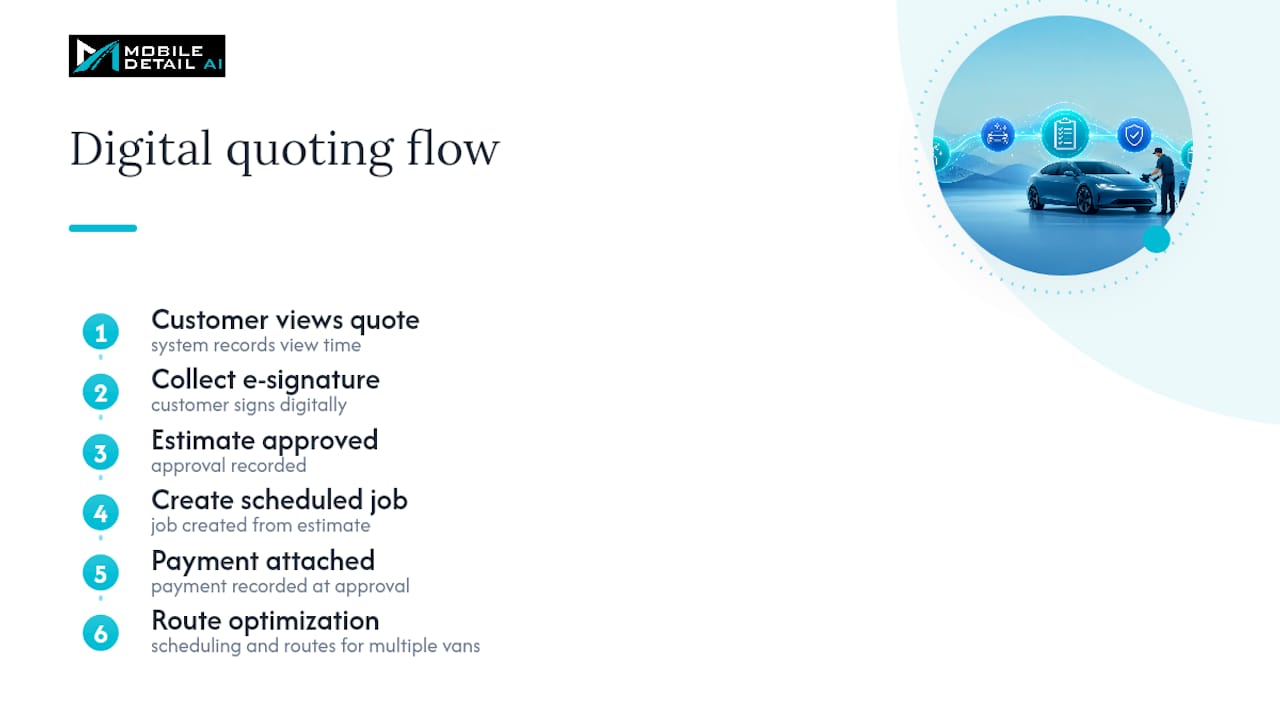
A printed estimate has no idea if the customer opened it. That's the gap digital quoting closes. Tools built for this let you see when a customer views a quote, collect an e-signature, and convert an approved estimate directly into a scheduled job with payment already attached. Add route optimization and scheduling on top, and a shop running multiple vans a day stops losing time to phone tag and paper shuffling. Solo detailers doing a handful of jobs a week may not feel the difference. Shops juggling five or more bookings a day, or ones tired of chasing signatures, are exactly the profile digital quoting was built for.
When to Stick With Paper and When to Upgrade
If you're a solo or mobile detailer running a manageable weekly schedule, a printable or editable PDF is usually plenty. However, when you're juggling multiple vans, chasing signatures over text, or losing track of which quote is still pending that the math flips. A few signs it's time: you're re-typing the same estimate into an invoice, customers keep asking "did you get my reply," or you can't remember which price you quoted last.
— Mobile
A Digital Alternative Worth Considering When You Outgrow the Spreadsheet
Mobiledetail is built for the moment a printable template stops keeping up with your booking volume. Instead of manually converting a signed PDF into a job, Mobile Detail AI tracks when a customer views your quote, lets them approve it digitally, and pushes that approval straight into a scheduled job with payment processing attached. That combination of view tracking and instant conversion shortens the gap between sending a quote and getting paid for it.

It's built for detailers running multiple vans, juggling recurring bookings, or tired of manually chasing approvals through text and email. If your Excel sheet has started feeling like a second job, check out Mobile Detail AI's platform and see whether its scheduling, route optimization, and quoting tools fit how your shop actually runs.
Sources
- Free Auto Detailing Estimate Template | Arrivy
- Free Car Detailing Quote Template | Docelf
- Detailing Estimate Template - Venngage
FAQ
How much should I tip for a $200 car detail?
Tipping isn't standard practice for auto detailing the way it is for restaurant service, since detailers set their own pricing to reflect labor and materials.
How do I write a cleaning estimate for a detailing job?
Start with your business info and the customer's vehicle details, then build an itemized table listing the base package and any add-ons as separate priced lines. Close with a subtotal, tax, total, a validity date, and a signature line so the estimate can convert directly into an authorized job.
How do I price a car detailing job?
Base your price on vehicle size and condition first, then add line items for specific issues like pet hair, stains, or oxidation rather than folding everything into one flat number. Structuring services in tiers, basic, premium, and a top package, helps customers compare options and often pushes them toward the higher tier.
Is there a free template for detailing or cleaning quotes?
Yes. Free downloadable options exist as fillable PDFs, like Docelf's template, and as Excel or Google Sheets files that include built-in formulas for totals and tax. If you outgrow static templates, platforms like Mobile Detail AI offer digital quoting that tracks views and converts approvals into scheduled jobs automatically.